3D spectra utilities
3D spectra utilities#
ɣ-ɣ-ɣ player (radware style)#
Cubix allows you to create and read cubes using the Radware cube format.
Reading an already existing Radware's cube#
Let us suppose the cube main file is named "mycube.cub". Opening this file in Cubix will try to load the following files:
- mycube.tab: file giving the binning definition (in Radware, a binning adapted to the detector resolution is often used). If no such file is found, a default one is taken.
- mycube.spe: total projection spectrum. If no such file, the total projection will be generated for the first read.
- mycube.2dp: 2D projection matrix. If no such file, it will be generated for the first read.
- mycube.bg.spe: background spectrum. If no such file, it will be automatically calculated.
- mycube.aca: energy calibration file. If no such file, the cube will be considered already calibrated.
- mycube.aef: efficiency file. If no such file, efficiencies are ignored (not used in the current version).
Another option is to define the file: "mycube.conf" containing all these links, as:
2DProj mycube.2dp
LUT mycube.tab
CalFile mycube.aca
TotalProj mycube.spe
EffFile mycube.eff
CompressFact 2
This second option allows you to change the file names more easily if needed, and allows you to define the compression factor. This is used for binning of 0.5 keV/channel, for example (compression factor of 2).
To open a cube, double click on the file with the .cub extension. It will open the cube properties as follows:

To load the cube player utility, double click on the Cube file (shown by the red arrow in the picture above).
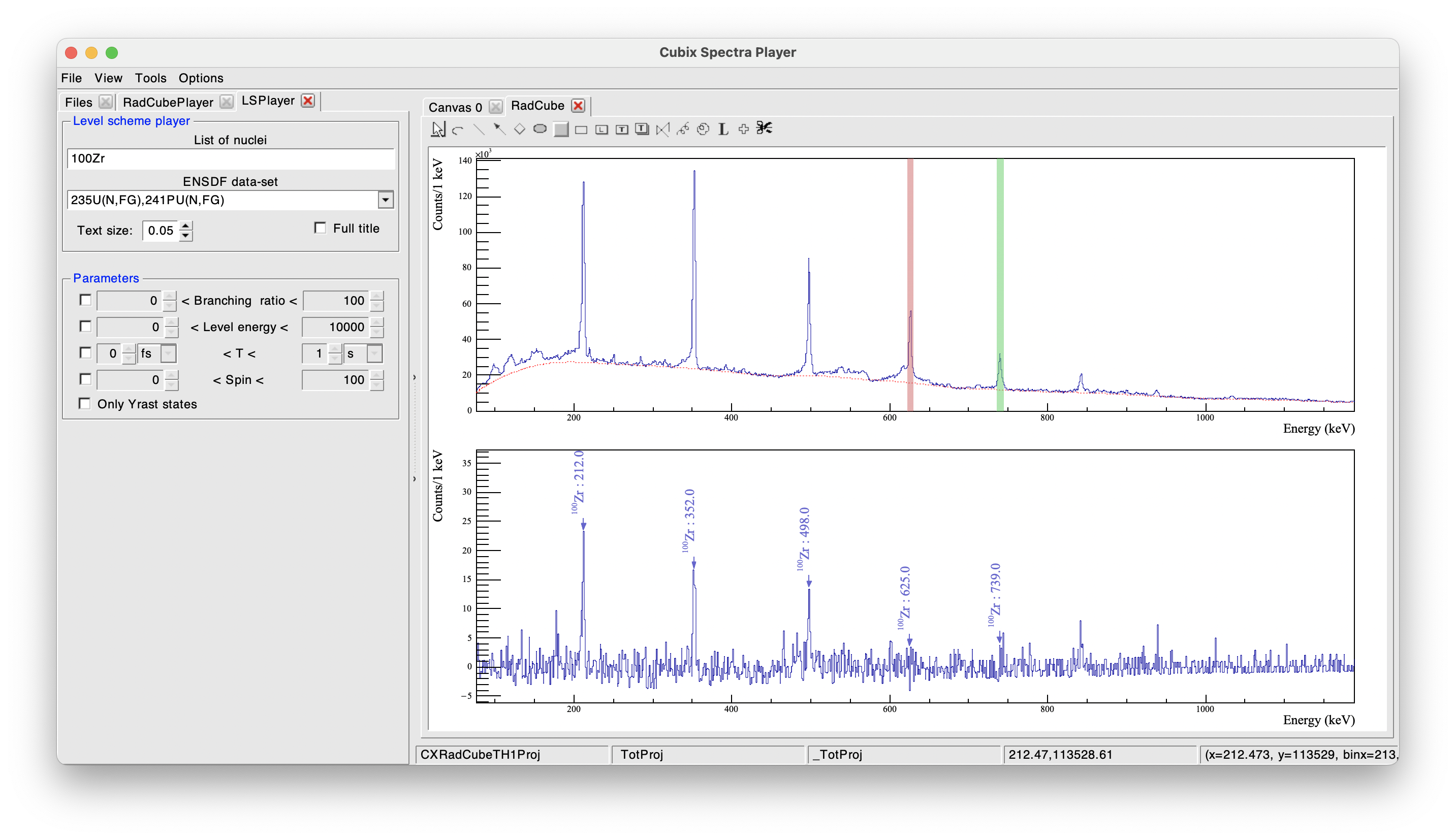
As for the Radware \(\gamma-\gamma\) player, gates can be set by clicking on the "Gate 1" and "Gate 2" buttons. The projection will use the gate(s) of Gate 1 AND Gate 2. In case of multiple gates, the combinations between "Gates 1" AND "Gates 2" will be summed.
Keyboard shortcuts: * g + g to define a new "Gate 1" by defining manually the centroid and width * Shift + g + g to define a new "Gate 2" by defining manually the centroid and width
In the following example, we can see two gates set on \(10^{+} \rightarrow 8^{+}\) and \(8^{+} \rightarrow 6^{+}\) of \(^{100}\)Zr in a Radware cube coming from fission data. We can clearly see in the projection the transitions in coincidence, namely the \(2^{+} \rightarrow 2^{+}\), \(4^{+} \rightarrow 2^{+}\) and \(6^{+} \rightarrow 4^{+}\).
Creating a cube from a TTree#
Cubix provides a program to build a cube in the Radware format from a ROOT TTree. A cube configuration file needs to be defined as in the following example (an example configuration file is located in $CUBIX_SYS/conf/CubeBuilder.conf):
#######################
### Cube Properties ###
#######################

# Name of the 3D cube file
CubeFileName MyCube
# Compression factor (to obtain binning <1 keV, one needs to scale the energy)
# For example, to obtain a minimal 0.5 KeV/Channel, we fill the Cube on 8k channel for 4keV range ==> Compression factor = 2
CompressionFactor 1

# Must be a power of 2. Max range of the cube
CubeSize 4096

# scratch file used as buffer in cube building in MB
ScratchSize 512

################################
## Input Root Tree Properties ##
################################

#Name of the input TTree (regular expressions can be used as for building TChain)
TreeFile E680_TTree_100Zr.root

#Name of the TTree
TreeName 100Zr_Z_40_A100

#Events to process (0 => All)
NEvents 0

#Name of the branch corresponding to the gamma-ray energy
EGamma EGammaDC

#Name of the branch corresponding to the gamma-ray multiplicity
GammaMult MGamma

#Cut to be applied (see TTreeFormulaExpression)
Cut None
To create the cube, use the command:
This should produce an output like:
...
...Done creating new cube.
Axis length of 3d cube is 4096.
3d cube has 45001728 minicubes and 11009 records.
Making sure we have enough scratch space...
...Done.
Scan started:  Tue Nov  7 08:36:54 2023


-- INFO    : Input Tree reading to build the database...
Total 11405842 events |===================>| 99.72% [ 2.34e+06 evts/s, time left:   0h00min00s ]
-- INFO    : Building the cube...
...Updating cube from scratch file:  Tue Nov  7 08:37:02 2023

There are 5494 chunks to increment...
...
The process will end by creating the 1D and 2D projections of the cube. At the end, the current folder should contain the following files:
-rw-r--r--@ 1 dudouet  staff       1140  6 nov 11:32 CubeBuilder.conf   # configuration file for the CubeBuilder program
-rw-r--r--  1 dudouet  staff  536870912  7 nov 08:37 MyCube.scr     # temporary scratch file used to build the cube (size parametrized in CubeBuilder.conf)
-rw-r--r--  1 dudouet  staff        864  7 nov 08:37 MyCube.log     # log file of the cube building
-rw-r--r--  1 dudouet  staff   49090488  7 nov 08:37 MyCube.cub     # cube file to be open in cubix
-rw-r--r--  1 dudouet  staff   67108864  7 nov 08:37 MyCube.2dp     # 2D projection of the cube
-rw-r--r--  1 dudouet  staff      16424  7 nov 08:37 MyCube.spe     # 1D projection of the cube
-rw-r--r--  1 dudouet  staff         39  7 nov 08:37 MyCube.conf    # configuration file of the cube (to get the compression factor for example)
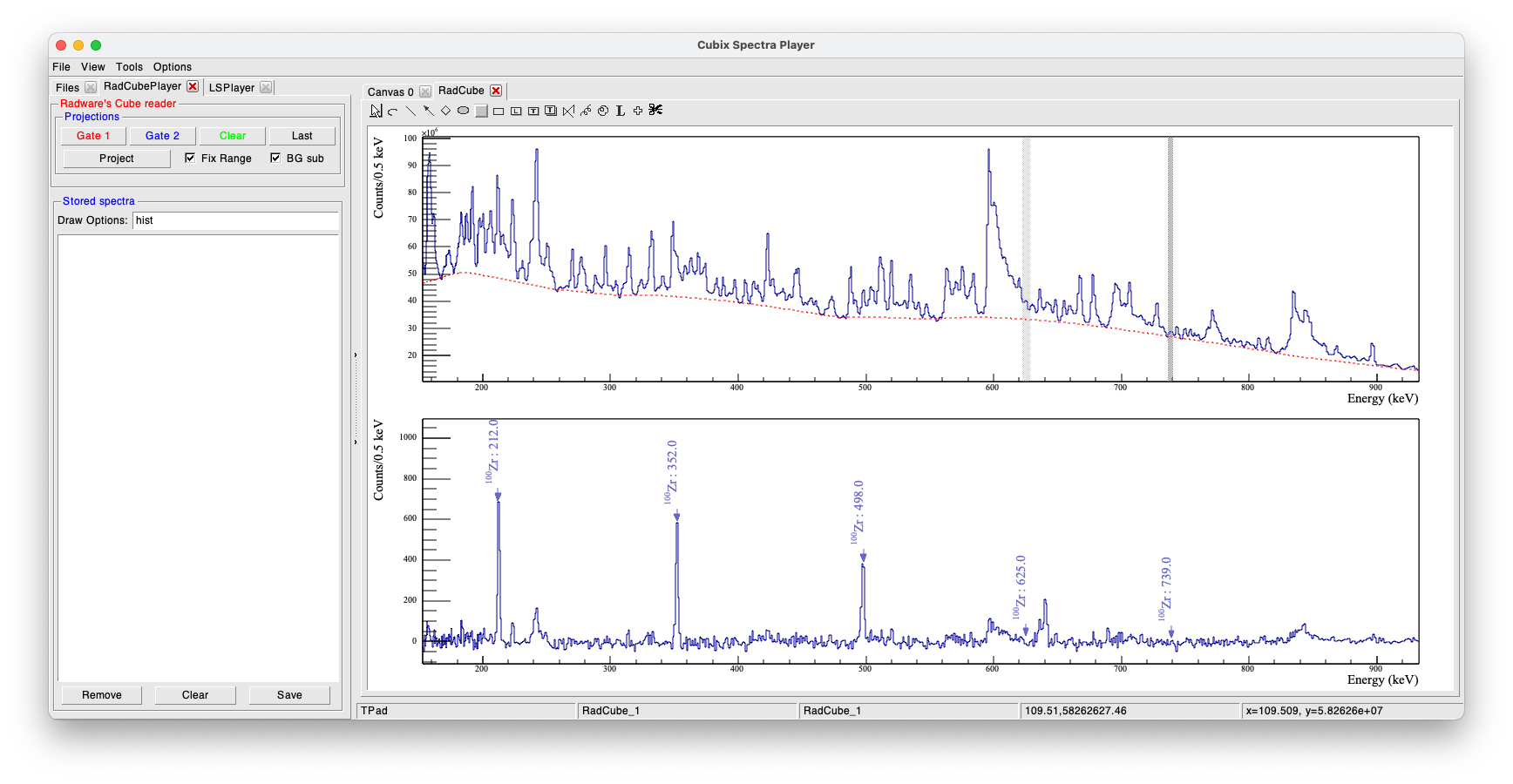
This new cube has been built from AGATA/VAMOS fission data filtered by VAMOS on 100Zr events. We can open it and apply the same gates as in the previous example: